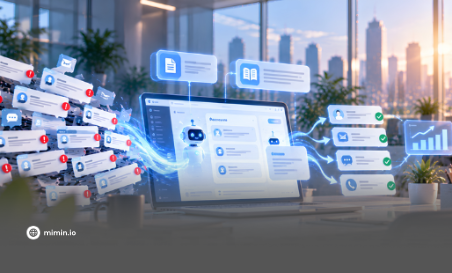
Retail brands receive customer inquiries through multiple channels, including WhatsApp, Instagram, TikTok DMs, and web chat. As order volumes grow, managing these platforms separately can lead to missed messages, delayed responses, and difficulty tracking unresolved requests.
For COOs and Customer Experience leaders, the real challenge is ensuring every inquiry reaches the right person at the right time.
When Every Channel Lives in a Different Tab
Consider a consumer goods brand running a payday promotion. One customer asks via WhatsApp whether a product is back in stock. Another sends an Instagram DM because a promo code is not working, while a third uses web chat to request a delivery address change.
During busy periods, support agents may struggle to track which inquiries have been answered and which still need attention.
Three Common Problems with Separate Communication Channels
As customer interactions increase, three operational challenges often emerge.
1. Missed Customer Messages
When agents monitor multiple platforms separately, new messages can go unnoticed, particularly during peak periods. Unanswered inquiries can frustrate customers and potentially affect their purchase decisions.
2. Delayed Order Handling
Payment confirmations, delivery address changes, and stock availability checks often require timely responses. Delays in handling these requests can disrupt order fulfillment and lead to repeated customer follow-ups.
3. Disconnected Customer Information
Agents may need to access separate systems to check order history or customer details before responding. This takes additional time and makes it harder to provide assistance with the right context.
These challenges highlight the need for a system that centralizes conversations and allows teams to track each inquiry through resolution.
Bringing Customer Conversations Together with a Unified Inbox
A Unified Inbox brings conversations from multiple supported communication channels into one centralized workspace.
Instead of monitoring each platform separately, agents can access and respond to inquiries from a single interface. When connected to relevant business systems, the workspace can also display customer details and order information alongside conversations.
This allows support teams to:
- Manage conversations centrally: Access inquiries from connected channels in one workspace.
- View customer context: Refer to available customer details and order history while handling conversations.
- Categorize inquiries: Organize messages using tags such as Order Status, Return Request, or Product Inquiry.
- Track ongoing interactions: Identify conversations that are open, assigned, or awaiting further action.
To ensure inquiries reach the right people, Automation Routing can distribute conversations based on predefined rules, inquiry types, or agent availability.
For example, payment-related questions can be directed to the finance support team, while delivery complaints can be assigned to agents handling logistics issues.
Live Agent Tools, such as private notes and conversation transfers, also help agents share information and hand over conversations without losing important context.
From Conversation to Ticket to Resolution
A Unified Inbox centralizes conversations, while ticketing gives support teams a structured way to manage and track each inquiry.
A typical workflow involves five steps:
- Conversation Received: A customer sends a message through a connected communication channel.
- Ticket Created: The inquiry is recorded as a ticket and categorized by topic, such as Order Status or Return Request.
- Assignment and Routing: The ticket is assigned to an appropriate agent or team based on its category, priority, or routing rules.
- Inquiry Handling: The assigned agent responds to the customer and updates the ticket as the interaction progresses.
- Resolution: Once the issue is addressed, the ticket is closed and its history remains available for future reference.
For more complex requests, such as product exchanges or delivery disputes, Case Management provides a structured way to handle issues that require additional investigation or follow-up.
Relevant conversations, attachments, case details, and priority levels can be organized together. This helps teams maintain continuity when a case is transferred between agents.
Not every inquiry requires a complex case, but every customer issue should have a clear path toward resolution.
Using Customer Support Insights to Improve Retail Operations
Managing inquiries also requires visibility into support performance. Reports and dashboards can help retail businesses monitor key indicators, including:
- Open Conversations: The number of inquiries still awaiting a response or resolution.
- Resolution Time: How long it takes to address customer issues.
- Agent Performance: How effectively agents manage their assigned conversations.
- Customer Satisfaction: Feedback that helps evaluate service quality.
When combined with relevant order and transaction data, these insights can help COOs, Heads of E-commerce, and Heads of Customer Experience make informed decisions about staffing, workload distribution, routing rules, and recurring customer issues.
This allows teams to identify operational bottlenecks and improve support processes based on actual customer interactions rather than assumptions.
Managing Retail Customer Interactions More Effectively with Mimin
As retail businesses grow, managing customer conversations across multiple channels becomes more demanding. Mimin brings together several capabilities to help teams organize inquiries and manage them through a connected workflow:
- Unified Inbox & Ticketing: Centralize conversations from supported channels and organize inquiries into trackable tickets.
- Automation Routing: Distribute incoming conversations based on predefined rules and support requirements.
- Case Management: Organize and track complex customer issues that require additional handling.
- Live Agent Tools: Equip support agents with tools to manage conversations, collaborate, and transfer interactions while maintaining context.
By combining these capabilities, Mimin helps retail teams manage customer inquiries more systematically, reduce fragmented communication, and provide a more consistent support experience.
Book a Demo to see how Mimin's Unified Inbox and Ticketing solutions can support your retail operations.
ABOUT MIMIN
Mimin is an enterprise platform that enables businesses to build AI-driven conversational customer journeys. From chat commerce and automated campaign distribution to omnichannel agent inboxes and Agentic AI chatbots, Mimin helps businesses manage customer interactions and deliver more connected customer experiences.
Phone/WhatsApp: +62 856 0322 5212
Email: halo@mimin.io